Pixlr AI Photo & Video Editor
- 3.6
- Rating
- 100.00M
- Installs
- Free
- Price

 Analysis by App-foxy
I opened Pixlr AI Photo & Video Editor expecting a quick mobile editor, but it feels more like a compact creative toolkit. It covers ordinary photo adjustments, decorative effects, collage work, video creation, background removal, object removal, and AI-based face swapping in one place. That range is useful when I want to finish something on my phone without moving between several apps, although it also means the interface can feel busier than a single-purpose editor.
Pixlr AI Photo & Video Editor is a free photography app from Pixlr Pte Ltd, available for everyone and supported by optional in-app purchases. It has been around since Nov 14, 2012, and its current version is 3.8.4. With a 3.9 average from around 1.2 million ratings and over 100 million installs, it is clearly a familiar choice rather than an experimental newcomer.
How the editor feels in everyday use
My first impression is that the app is aimed at people who want visible results quickly. I do not need to understand professional editing terminology to make a picture brighter, add a mood, build a collage, or prepare a social post. The tools are arranged around common creative jobs, which makes the learning curve gentler than it would be in a full desktop-style editor.
You May Also Like

 Pandora - Music & Podcasts
Pandora’s Music Is Easy to Start, but Harder to Recover
Pandora’s strength is its low-effort path from a seed to a station. Its weak spot is how much confidence it asks you to place in connection, setup, and quiet recovery.

 8 Ball Pool
 Is Built on Rivalries, Rematches, and Routine
A close look at the rivalries, rematches, shared routines, and unanswered safety questions that turn a quick pool match into a persistent mobile community.

 Samsung Music
’s Quiet Strength Is Playing What You Already Own
Its reach comes less from spectacle than from dependable access to a personal library. That simplicity is both the app’s strongest retention engine and its ceiling.

 AccuWeather: Weather Radar
AccuWeather Review: A Quick, Clear Forecast for Everyday Decisions
For everyday plans, the best forecast is the one you can understand quickly. AccuWeather makes rain timing, radar, and local conditions easy to act on, with a few trade-offs.

 Hill Climb Racing
Why Hill Climb Racing Still Turns Crashes Into One More Run
A tiny car, a bumpy hill and one more upgrade: Hill Climb Racing keeps resurfacing because its simple chaos makes every near-miss feel personal.

 AliExpress - Shopping App
AliExpress Makes Global Shopping Feel Personal, but Shoppers Bear the Risk
AliExpress turns a global marketplace into a pocket-sized discovery engine. Its reach is useful, its shopping loop compelling, and its trade-offs easy to miss.
More From Our News Desk
View All News


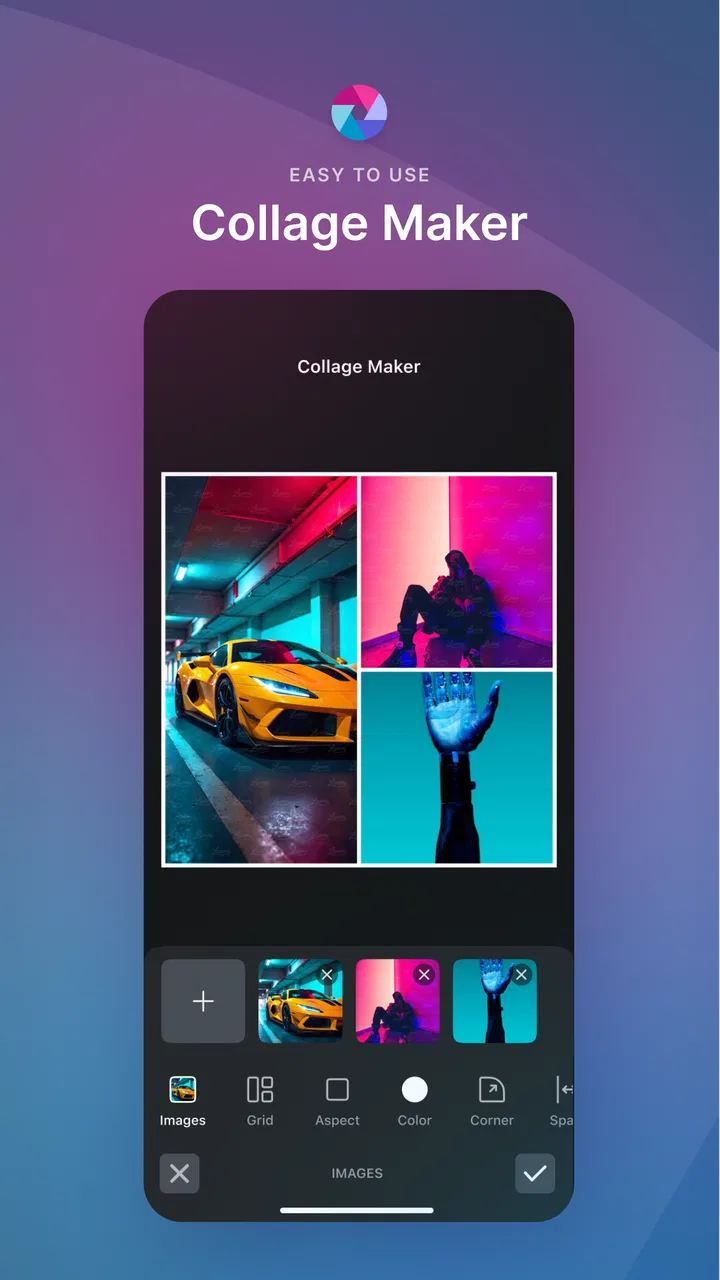
The strongest part is the variety. A simple image can become a polished post with filters and overlays, while a group of pictures can be turned into a collage without exporting everything to another application. The video generator also broadens the app beyond still photography. I would not treat it as a replacement for a dedicated video editor, but it is convenient when the goal is a short, attractive result rather than detailed timeline work.
The AI tools are where the experience becomes more dependent on the quality of the source image and the task itself. Background removal can save time when a subject is clearly separated from its surroundings. Object removal is more convincing when the unwanted item sits against a simple background. Busy textures, overlapping people, hair, reflections, and patterned surfaces are harder situations, so I would always inspect the edges before sharing the final image.
Face swapping is best approached as a playful effect rather than a precision retouching tool. It can be entertaining for casual edits, but the result may look less natural when faces are turned away, poorly lit, partly covered, or captured at very different angles. I also think it is worth being considerate about whose face is used and where the finished image is shared.
Where connectivity changes the workflow
The most important practical point is that Pixlr’s more ambitious features are not equally self-contained. AI processing, video creation elements, filters, and other creative resources may require communication with the service, so the app feels more comfortable when I have a reliable connection. I would not begin an important edit just before boarding a flight or entering a place with unstable reception unless I had already tested that particular workflow.
That matters because the app encourages experimentation. I might start with a photo, try several looks, remove an object, and then decide to turn the result into a collage or short video. If a network-dependent step pauses or fails, the creative momentum disappears. The basic editing process can still feel straightforward, but the broader the project becomes, the more I treat connectivity as part of the setup rather than an invisible detail.
For a connected home network, this is rarely a serious obstacle. On mobile data, I am more selective. A single quick adjustment is one thing; repeatedly previewing effects, generating AI results, or assembling video material can make the session less predictable. I prefer to prepare the images first, then use the heavier tools in one focused session instead of opening the app repeatedly throughout the day.
Useful mobile situations
A realistic example is preparing a small event announcement from a phone. I can choose a photo, clean an unwanted background detail, add a readable text treatment or visual effect, and combine several images into a collage. If the announcement needs motion, the video generator gives me a faster route than learning a timeline editor. The advantage is not that every result looks professionally produced; it is that the whole job can stay on one device.
It also works well for quick marketplace or community posts. Removing a distracting object from a product image can make the subject easier to understand, while a collage can show several angles without asking viewers to open multiple pictures. I would still check the edges and proportions carefully, because an aggressive automated edit can make a product appear misleading if it removes a meaningful detail.
For travel photos, I like the balance between speed and control. A filter can establish a consistent mood across several images, and collage tools are handy for a small trip recap. The trade-off is that strong filters can flatten differences between scenes. I usually apply the effect lightly, compare it with the original, and avoid making every image equally dramatic simply because the option is available.
On a phone with limited screen space, the app is more comfortable for short sessions than for a long, exacting retouch. Small alignment decisions become tiring when I am working with many layers or trying to perfect a fine edge. If the image is important enough to justify pixel-level control, I would move to a desktop editor or a more specialized mobile application.
Practical editing habits that improve results
One useful habit is to duplicate the original before trying AI tools or strong effects. Automated edits are fast, but it is easy to lose track of what changed after several experiments. Keeping the untouched image gives me a reliable comparison and makes it easier to undo a decision without rebuilding the project.
I also recommend doing cleanup before styling. If I remove an object after applying a bold filter, imperfections can become more obvious and the replacement area may not match the surrounding tones. A cleaner sequence is to correct distractions first, adjust the overall image second, and add decorative effects near the end. This is a small workflow change, but it reduces the need to redo the entire edit.
For collages, I get better results when I choose images with a shared visual idea rather than simply filling every available space. Similar lighting or a common color helps the layout feel intentional. Pixlr makes it easy to assemble several pictures, but the app cannot decide whether the collection tells a coherent story. That judgment still belongs to me.
When preparing a video, I would select the images and trim the story before spending time on effects. A short sequence with a clear beginning and ending usually feels more polished than a longer one overloaded with transitions. The generator is useful for quick presentation, but it is not a substitute for planning what the viewer should notice first.
What happens when a step fails
Connectivity problems are the most obvious source of friction, but they are not the only one. AI edits can produce an unconvincing result, a large project can become awkward to manage on a small display, and a chosen effect may not suit the image as well as its preview suggested. My recovery method is simple: save or preserve the source, leave the failed step, and try a less ambitious correction rather than repeatedly forcing the same result.
If an online-looking operation stalls, I would avoid tapping the command over and over. Repeated attempts can make it unclear whether the first request is still processing or whether nothing happened. I prefer to wait briefly, return to the working image if possible, and then retry once with a simpler source or a smaller goal. This is especially sensible when using mobile data.
For object removal, a failed result is often a sign that the selected area was too large. I get more believable repairs by working in smaller sections and checking the boundary after each change. If the object overlaps a person or an important pattern, cropping or reframing may look more natural than asking the tool to reconstruct a complicated area.
Background removal deserves the same caution. A clean cutout is not guaranteed merely because the subject is recognizable. Hair, transparent objects, thin straps, and shadows can be lost or handled unevenly. I would place the result on a contrasting background during inspection; flaws that disappear on white may become obvious on a dark design.
Face swapping can fail for reasons that are not really technical errors. A source face with a different expression, angle, or light direction may produce an awkward blend. Choosing images with similar framing gives the tool a fairer chance, but I still see this feature as entertainment. For a serious portrait correction, manual retouching offers more predictable control.
Using the app carefully with mobile data
Because the app combines ordinary editing with AI and video-oriented tools, I would use it with a deliberate data routine. I start connected to dependable Wi-Fi when I know I will be testing several effects or generating multiple versions. I also avoid opening a large creative project repeatedly just to make tiny changes. Batching the work into one session is more efficient and easier to monitor.
It is also sensible to review the final image before exporting several variations. Creative apps make experimentation tempting, but a folder full of near-identical files is difficult to organize and may consume more storage than expected. I keep only the versions that solve a real purpose: the original, a working copy, and the final export.
Privacy deserves ordinary common sense here. Photos can contain faces, addresses, documents, children, or private surroundings. I would not upload sensitive material to an AI feature casually, and I would remove identifying details before creating a public face-swap joke. The app’s Everyone rating describes its age suitability, not a guarantee that every image is appropriate to share publicly.
The free entry point makes it easy to try the editor, but optional purchases range from $0.99 to $79.99 per item. I would explore the free workflow first and decide whether the tools I actually use justify spending money. Someone who only needs occasional cropping, basic filters, or a simple collage may find the free experience sufficient, while frequent creators should pay attention to which advanced elements are part of their preferred routine before committing.
How it compares with familiar alternatives
Compared with a basic gallery editor, Pixlr offers much more creative range. A gallery tool is usually faster for rotating, cropping, and making a quick brightness adjustment, but it does not give me the same combination of collage design, AI effects, background work, and video-oriented creation. If I only need a minor correction, opening Pixlr may feel unnecessary; if I want a finished visual, the extra options become valuable.
Compared with a dedicated collage app, Pixlr is broader but potentially less focused. A specialist may make layout selection feel faster, especially when the entire task is arranging pictures. Pixlr becomes the better choice when I want to edit the individual images, remove distractions, and then build the collage without changing applications.
Against a professional mobile retouching tool, Pixlr is friendlier and more immediate, but it does not replace precise control. Professionals who need repeatable color work, detailed masking, or carefully managed layers may prefer a specialized editor. Pixlr suits the person who wants a convincing result quickly and is willing to inspect the output rather than adjust every technical parameter.
Dedicated video editors remain stronger for long projects, exact timing, audio control, and complex sequences. Pixlr’s advantage is convenience when the video is really a visual recap, announcement, or social clip assembled from a few images. I would choose it for speed, not for a demanding production workflow.
Who will enjoy it, and who should skip it
I recommend Pixlr AI Photo & Video Editor to casual photographers, students, small sellers, travelers, and social creators who want several useful tools in one mobile app. It is particularly appealing if you regularly move between still images, collages, quick videos, and playful AI effects. The broad toolkit means I can solve different small jobs without maintaining a collection of narrowly focused editors.
I would be more cautious if you need dependable work in places with weak connectivity, exact professional retouching, or a completely distraction-free interface. Users who dislike experimenting with automated effects may prefer a simpler editor with fewer choices. Likewise, anyone working on confidential images should think carefully before using AI-oriented functions and should choose tools that fit their own privacy requirements.
The app’s Everyone rating makes it approachable for a broad audience, but younger users still benefit from guidance around purchases, sharing, and the use of other people’s faces. The creative tools are easy to start using, which is a strength, yet ease of use can also encourage quick sharing before an image has been checked closely.
My connectivity verdict
After using it as an all-purpose mobile editor, I see Pixlr AI Photo & Video Editor as a strong convenience choice rather than a replacement for every specialized application. Its best quality is the way several creative tasks sit together: photo styling, collage building, object and background work, face-swap experimentation, and short video creation. That combination saves time when the goal is to publish or share something attractive without a long setup.
The main limitation is that the richer the project becomes, the more I want a stable connection, patience with automated results, and a habit of keeping originals safe. I would use it confidently for everyday creative work, preferably planning heavier sessions when my connection is reliable. If that matches how you edit, the free download is worth trying before considering any optional purchase.
My final take: Pixlr is at its best when I need a flexible, fast mobile studio for several kinds of visual content. It is less convincing as a precision tool or a guaranteed solution for difficult AI edits. Used with realistic expectations, careful checking, and sensible data habits, it gives everyday creators a practical way to turn ordinary phone photos into shareable designs.
FAQs for Pixlr AI Photo & Video Editor
01What features does Pixlr AI Photo & Video Editor offer?
Pixlr AI Photo & Video Editor provides a comprehensive suite of editing tools for both photos and videos. Users can access AI-powered enhancements, filters, overlays, and effects. Additionally, the app offers advanced features like layer editing, color correction, and retouching options, making it suitable for both beginners and professional editors.
02Is Pixlr AI Photo & Video Editor free to use?
Pixlr AI Photo & Video Editor is available as a freemium app, meaning users can access basic editing features at no cost. However, advanced tools and effects may require a subscription or one-time purchase. This model allows users to try out the app before committing to any financial investment.
03What are the system requirements for Pixlr AI Photo & Video Editor?
To run Pixlr AI Photo & Video Editor smoothly, users need a device with Android 5.0 or iOS 11.0 and above. The app requires sufficient storage space for editing and saving media files. While it works on most devices, performance may vary depending on the device’s specifications.
04Can I use Pixlr AI Photo & Video Editor offline?
Some features of Pixlr AI Photo & Video Editor can be used offline, such as basic editing tools and filters. However, certain AI-powered features and cloud storage options require an internet connection. It's advisable to have connectivity for accessing the full range of options and updates.
05How does Pixlr AI Photo & Video Editor protect user data?
Pixlr AI Photo & Video Editor prioritizes user privacy and data security. The app adheres to standard data protection regulations, ensuring that personal information and edited content are not shared without consent. Users can review the app’s privacy policy for detailed information on data handling practices.
Pros
- Intuitive user interface
- easy for beginners.
- Wide range of filters and effects.
- Supports high-resolution editing.
- Regular updates with new features.
- Seamless integration with social media.
Cons
- Some features require in-app purchases.
- Occasional ads can be intrusive.
- Limited video editing options.
- Requires internet for some functionalities.
- Can be resource-heavy on older devices.

Pixlr AI Photo & Video Editor
Gallery